The "Missing Body" Mystery: Bundling Webapps, CORS, and Android’s Oldest WebView Bug
We recently made a major architectural shift in our hybrid Android application. What started as a standard performance optimization turned into a deep dive into CORS headers, native proxying, and a battle with a notorious 7-year-old Android bug.
Here is the story of how we bundled our webapp, broke our networking, tried to fix it with a native proxy, and finally worked around Android Issue #119844519.
Phase 1: The Status Quo (Hosted Webapp)
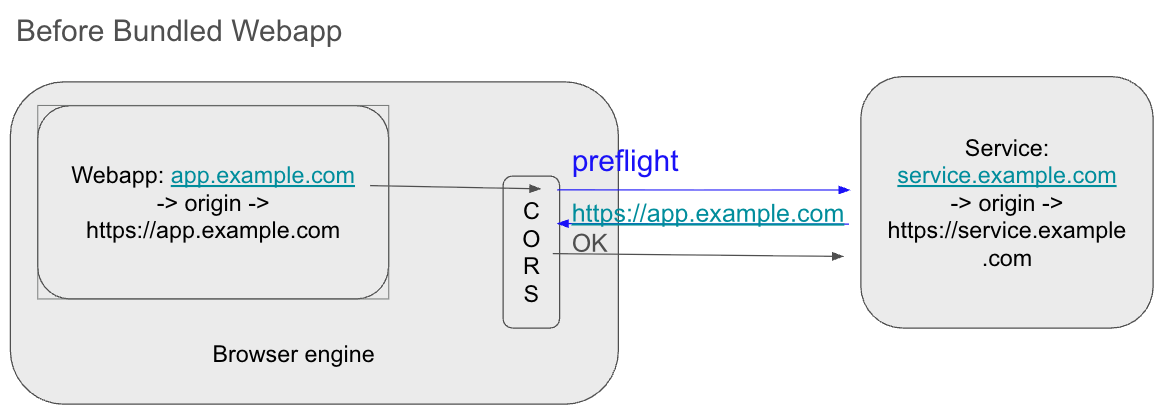
Our app is a hybrid: a native Android wrapper around a comprehensive web application. Initially, this webapp was hosted on a remote server (app.example.com).
The architecture was simple. The WebView loaded the remote URL. When the webapp needed data, it made requests to our backend services at service.example.com. Because the Origin (app.example.com) and the Service (service.example.com) were different, the browser triggered Cross-Origin Resource Sharing (CORS) checks.
Since our backend services knew about app.example.com, they returned the correct Access-Control-Allow-Origin headers. Everything worked perfectly.
Phase 2: Bundling for Performance
To improve load times and offline capabilities, we decided to stop fetching the webapp from the network. Instead, we bundled the HTML, JS, and CSS files directly into the Android app (on disk/assets).
We achieved this by intercepting requests in the WebView. If the WebView asked for https://local-webapp, we intercepted that request in the native code and served the files from the device's storage.
However, this introduced a CORS nightmare.
The webapp now had an origin of https://local-webapp (or file://, depending on implementation). When it tried to talk to service.example.com, the browser sent this new, unrecognized origin in the headers.
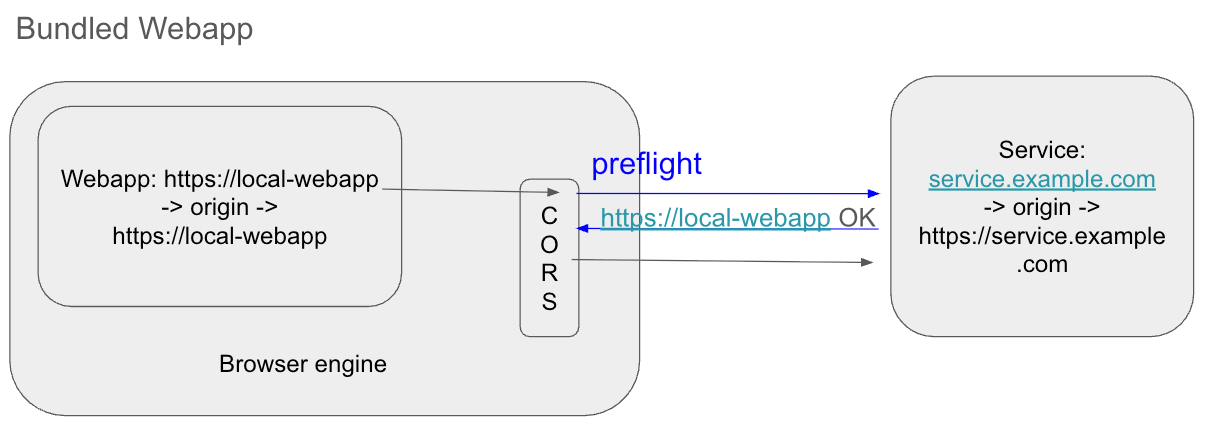
The backend services immediately rejected the requests. We considered whitelisting https://local-webapp on all our services and AWS configurations, but that posed significant issues:
- Security: We don't strictly "own" that origin in the public DNS sense.
- Maintenance: Updating every single microservice and API gateway for a client-side change is high-friction.
Phase 3: The "Native Proxy" Solution
We came up with a clever solution to bypass the backend changes entirely: A Native Proxy.
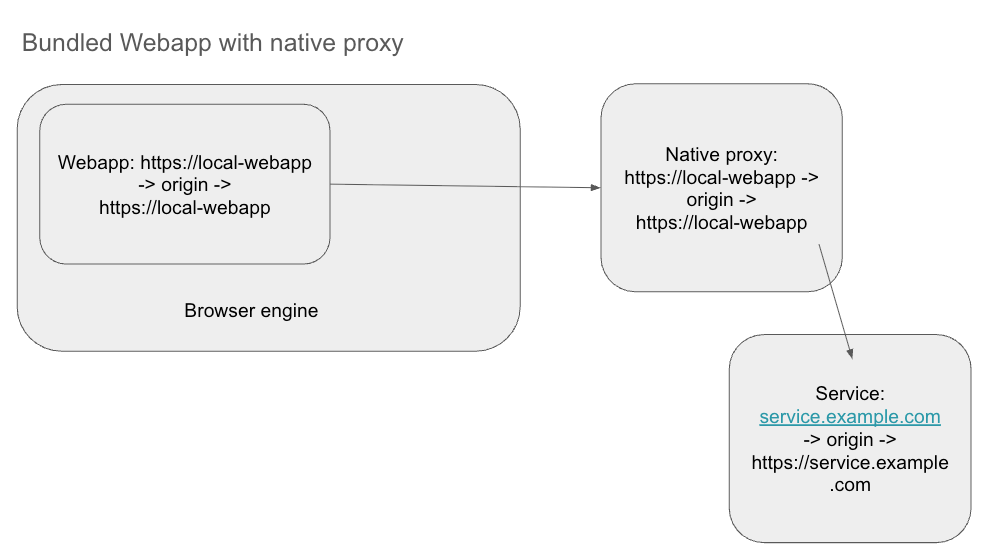
Instead of the webapp talking directly to service.example.com, we instructed it to send requests to a fake local endpoint: https://local-webapp/api/<real-service>.
The plan was:
- The WebView initiates a request to
https://local-webapp/api/.... - The Android native layer (via
WebViewClient.shouldInterceptRequest) catches this request. - The native app acts as a proxy: it takes the request, calls the real service (
service.example.com) using native HTTP clients (like OkHttp), and returns the response to the WebView.
Since the native HTTP client is not a browser, it ignores CORS completely. The WebView sees a response coming from its own "local" origin. Problem solved, right?
Phase 4: Hitting the Wall (Android Issue #119844519)
The proxy solution worked beautifully for GET requests. Data flowed, screens loaded, and I felt like a genius.
Then I tried to log in.
The login request was a POST containing credentials in the body. The request failed. Upon debugging, I realized that while I was successfully intercepting the request URL and headers, the body was empty.
I ran head-first into Android Issue #119844519.
The WebResourceRequest object passed to shouldInterceptRequest does not expose the HTTP body. The Android WebView API simply drops it. This means you cannot natively proxy POST or PUT requests because you cannot forward the data payload.
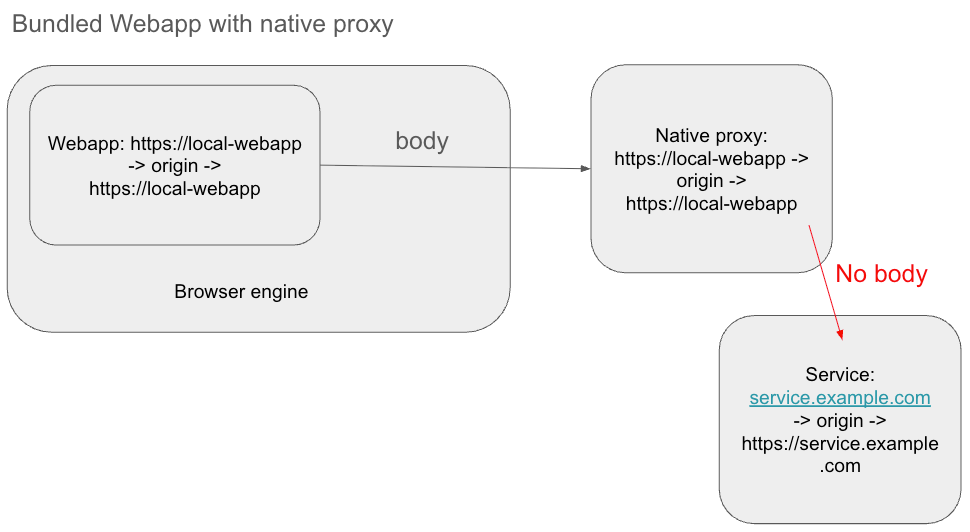
This bug has existed for years. The technical reason is complex (involving performance overhead in passing large data blobs between the Chromium rendering process and the Android Java process), but the result is simple: You cannot intercept POST bodies in standard Android WebView.
I commented in January this year on the issue, asking for updates on plans to fix it. But I don't have high hopes since it's been open for 7 years with no resolution.
The Solution: JavaScript Injection
Since I couldn't get the body from the outside (Java/Kotlin), I had to grab it from the inside (JavaScript) before it even left the rendering engine.
I utilized the Android-Request-Inspector-WebView library (and the general pattern it implements).
Here is how the workaround functions:
- Inject JS: The library injects JavaScript into the WebView that overrides the default
window.fetchandXMLHttpRequestfunctions. - Capture: When the webapp makes a request, this injected JS records the body payload.
- Bridge: It passes this body data to the Android native layer via a
JavascriptInterface. - Merge: The native layer now has the intercepted request plus the body data delivered by the JS bridge. It merges them to reconstruct the full request.
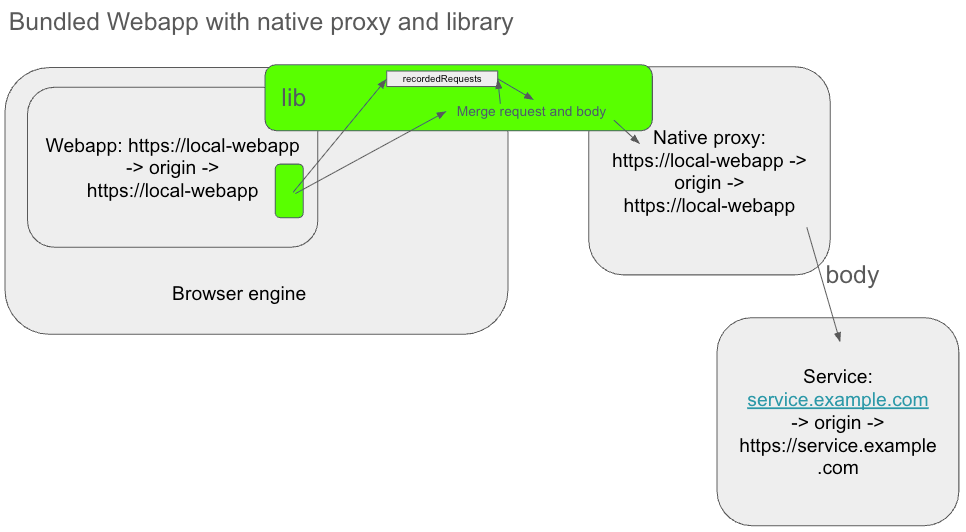
With this "side-channel" for the body data, my native proxy finally became fully functional. I could now intercept, proxy, and serve all requests—GET, POST, and PUT—without modifying a single line of backend configuration.
Read more in the next block entry, because this is not the end of the story. The injected JavaScript approach has its own issues, which I had to improve in order to use this solution.
Summary
- The Goal: Bundle a webapp locally but still talk to remote APIs.
- The Blocker: CORS errors because of the local origin.
- The Fix: A native proxy to bypass CORS.
- The Bug: Android's
shouldInterceptRequestdeletes POST bodies. - The Workaround: Injecting JavaScript to extract the body and pass it to native code manually.